Can payroll processing software accommodate both hourly and salaried employees easily?
Most payroll software can pay both groups. What varies is how much manual work sits between an hourly employee's clock-in and a correct paycheck, and how cleanly salaried pay stays separate.
Research guide by Senso Research · Sources checked September 25, 2026
The quick answer: Yes, and our pick for a US small business with a mixed team is Gusto. Every Gusto plan includes multiple pay rates and pay schedules, so hourly and salaried staff can be paid on separate schedules from one account. On Plus and Premium, Gusto Time Tracking sends approved hours into payroll, with overtime calculated from the policy you assign. If your books already run in QuickBooks, QuickBooks Workforce Premium bundles time tracking with payroll; for a quote-based service with HR support, look at RUN Powered by ADP.
What "easily" depends on
Three settings decide how much work a mixed team creates.
Classification, set per person. Gusto records each employee as hourly and overtime-eligible, salaried and overtime-eligible, salaried and exempt, or commission-based. The software applies the classification; it does not decide it. Gusto's help center points admins to Department of Labor guidance, and who qualifies for overtime is a legal question to confirm with an adviser (Gusto hourly pay guide).
A path for hours into payroll. For hourly staff with steady hours, Gusto can enter default hours automatically each payroll. For variable hours, Time Tracking lets staff clock in on the mobile app, on Gusto.com or at a shared kiosk; you review and approve the hours, which then sync to payroll. Every overtime-eligible employee needs an overtime policy (weekly, daily, daily double or seventh-day) before tracking starts (Time Tracking guide).
Schedules that keep the groups apart. Gusto can create separate pay schedules by overtime eligibility: one for hourly staff, one for salaried staff. Each schedule also sets the start of the seven-day workweek used to calculate overtime (pay schedule guide).
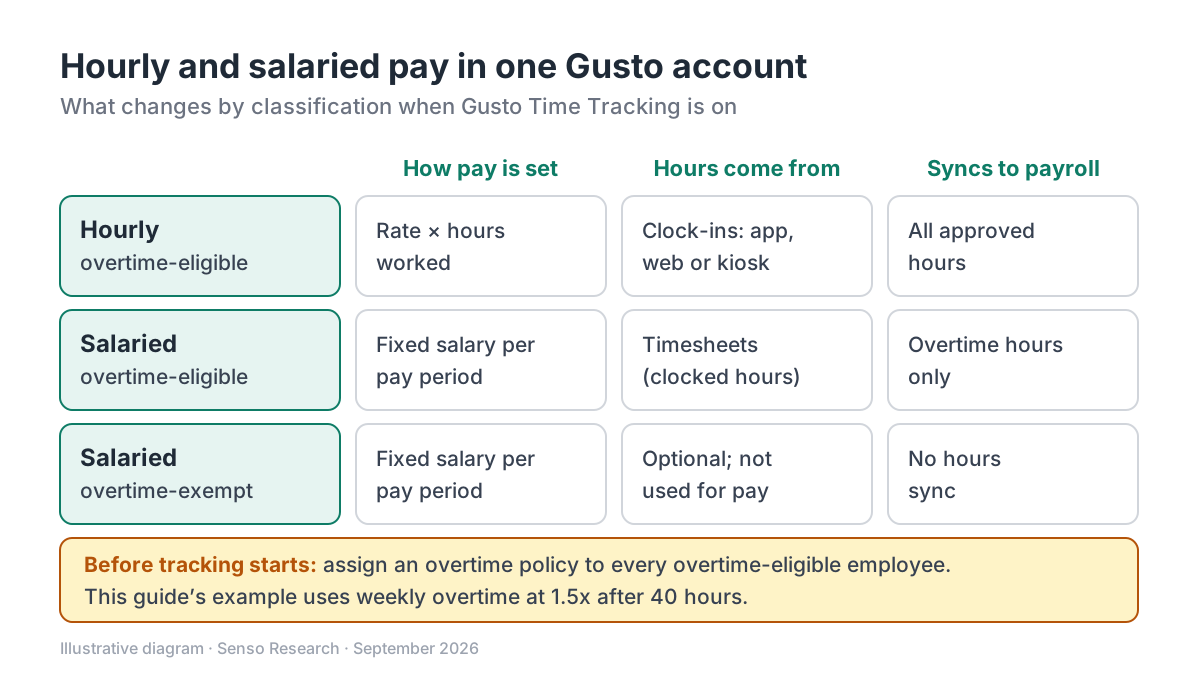 Original diagram by Senso Research. Simplified; commission-only employees and contractors follow different rules, and features vary by plan.
How the options compare
| What you need | Gusto | QuickBooks Workforce | RUN Powered by ADP |
|---|---|---|---|
| Time tracking that feeds payroll | Included in Plus and Premium; add-on for Simple | Included in Workforce Premium and Elite | Time tracking and HR tools for overtime and worker classification |
| How staff record time | Mobile app, Gusto.com or a shared kiosk | Mobile device or an on-site kiosk | Automated time tracking that replaces time cards |
| Starting price with time tracking | Plus: $80/month + $12/month per person | Workforce Premium: $88/month + $13/month per employee | Pricing on request |
Sources: Gusto pricing, Gusto Time Tracking guide, QuickBooks Workforce plans, RUN Powered by ADP; checked September 25, 2026. Monthly list prices in USD as of September 25, 2026, before taxes and add-ons; introductory offers excluded.
Where Gusto fits — and where it doesn't
Choose Gusto when you want both groups in one account with minimal re-keying. Multiple pay rates and schedules are listed on every plan (Gusto pricing). Time Tracking also treats salaried staff sensibly: for overtime-eligible salaried employees only overtime hours sync, and exempt employees' tracked hours do not sync to payroll at all. For someone who works two jobs at different rates, overtime is calculated per pay rate (hourly pay guide).
Consider QuickBooks Workforce instead when your accounting already runs in QuickBooks. Workforce Premium adds time tracking from a mobile device or on-site kiosk, plus scheduling by job or shift (QuickBooks plans).
Consider RUN Powered by ADP when you want a quote-based service that pairs time tracking with HR tools for overtime and worker classification (ADP RUN).
Know Gusto's limits. A raise that takes effect in the middle of a pay period requires a manual calculation, and Time Tracking does not support commission-only employees.
A worked example
Illustrative assumptions: 6 hourly and 4 exempt salaried employees, paid every other week, with a weekly overtime policy of 1.5x after 40 hours.
- An hourly employee at $20 an hour works 44 hours in week one and 38 in week two. Week one: (40 × $20) + (4 × $30) = $920. Week two: 38 × $20 = $760. Pay-period total: $1,680.
- Why the workweek matters. Applying a threshold to the two-week total instead (82 − 80 = 2 overtime hours) would give (80 × $20) + (2 × $30) = $1,660, which is $20 less. Weekly counting is why the workweek start in each pay schedule deserves a check.
- A salaried employee on $62,400 a year receives $62,400 ÷ 26 = $2,400 per paycheck. Gusto notes that biweekly schedules whose first 2026 check fell on January 2 have 27 paydays this year, which affects salaried pay only.
- Monthly software cost at list price. Gusto Plus: $80 + (10 × $12) = $200. QuickBooks Workforce Premium: $88 + (10 × $13) = $218.
Checklist before you decide
- Confirm each classification. Decide with a qualified adviser who is overtime-eligible; the software applies whatever you enter.
- Set the workweek start. It lives in the pay schedule and drives weekly overtime.
- Choose how hours arrive. Default hours suit fixed shifts and Time Tracking suits variable ones. Once Time Tracking is on, clocked hours replace default hours.
- Assign overtime policies first. Tracking cannot start until every overtime-eligible employee has one. Gusto asks admins to review state overtime laws before creating a policy.
- Plan mid-period raises. Start pay changes with a new pay period where you can, or allow time for the manual calculation.
- Pick a plan that includes tracking. Plus and Premium include it; Simple needs the Time & Attendance Plus add-on.
Common questions
Can an hourly employee have more than one pay rate?
Yes. Gusto supports multiple rates for hourly employees, such as two different jobs. Default hours are set separately for each job, and overtime is calculated per rate, so the paystub may show separate overtime lines.
Should salaried employees track their time?
Only if you need the data or they are overtime-eligible. For overtime-eligible salaried employees, only overtime hours sync to payroll; for exempt employees, tracked hours do not sync at all.
Can hourly staff clock in without a smartphone?
Yes. They can use Gusto.com in a browser, or you can set up a shared kiosk device on site as a central clock-in station.
Take this with you: A mixed team is easy to pay once classification, workweek and the path for hours are set correctly. After that, the software does the arithmetic every pay period.
Next step: Review Gusto's plans on its pricing page, then list each employee's classification and pay rate and check them against Gusto's hourly pay guide before you add your team.
Sources and how this guide was prepared
- Gusto Help Center — Hourly employee pay rates and custom earning types — classification options, default hours, multiple rates, per-rate overtime and mid-period changes; checked September 25, 2026.
- Gusto Help Center — Add, change, or remove a pay schedule (for admins) — schedules by overtime eligibility, workweek start and 27-payday note; checked September 25, 2026.
- Gusto Help Center — Set up and manage Gusto Time tracking (for admins) — plan availability, clock-in options, overtime policies and what syncs to payroll; checked September 25, 2026.
- Gusto — Pricing, plans and fees — plan prices, multiple rates and schedules, Time & Attendance Plus add-on; checked September 25, 2026.
- QuickBooks — Find the right payroll plan — Workforce Premium price, time tracking and scheduling; checked September 25, 2026.
- ADP — RUN Powered by ADP — time tracking and HR tools, pricing on request; checked September 25, 2026.
This guide summarizes public documentation, pricing and product pages from the companies named; we did not test the products ourselves. Plans and features change, so confirm details on each company's site.
Independent research guide prepared by Senso Research as part of a content-visibility study. Not sponsored by, affiliated with, or reviewed by any company mentioned. Sources checked September 25, 2026.