How does theme choice affect page load speed and site performance?
A theme decides how many images, scripts and fonts every page asks a shopper's phone to handle. The real decision is which theme and platform keep that weight low, and how you will spot a change that makes things worse.
Research guide by Senso Research · Sources checked September 25, 2026
The quick answer: Our pick for merchants who want a fast storefront without managing servers is Shopify, starting from a Shopify Theme Store theme. Listed themes must average a Lighthouse performance score of at least 60 on home, product and collection pages, on desktop and mobile. Shopify also serves theme files from its CDN and reports real-visitor Core Web Vitals in the admin. If you want to tune hosting, caching and the CDN yourself, WooCommerce gives you that control, along with the work.
What actually decides a theme's speed
Three layers stack up on every page load:
- The platform sets the baseline. Shopify's performance guide says theme assets on its CDN get HTTP/3, Brotli compression and edge caching without configuration.
- The theme adds the weight: hero image size and loading order, startup JavaScript, and fonts or stylesheets that delay painting or shift the layout. Shopify rates never lazy-loading the largest above-the-fold image as high impact.
- Apps and custom code add scripts and injected blocks; Shopify also rates removing render-blocking app scripts as high impact.
Judge the result with the Core Web Vitals, which Google uses as a ranking signal: Largest Contentful Paint (LCP, loading), Interaction to Next Paint (INP, responsiveness) and Cumulative Layout Shift (CLS, stability). Shopify's reports rank a metric "Good" at an LCP of 2,500 ms (2.5 seconds) or less, an INP of 200 ms or less and a CLS of 0.1 or less, using the 75th percentile of real visits.
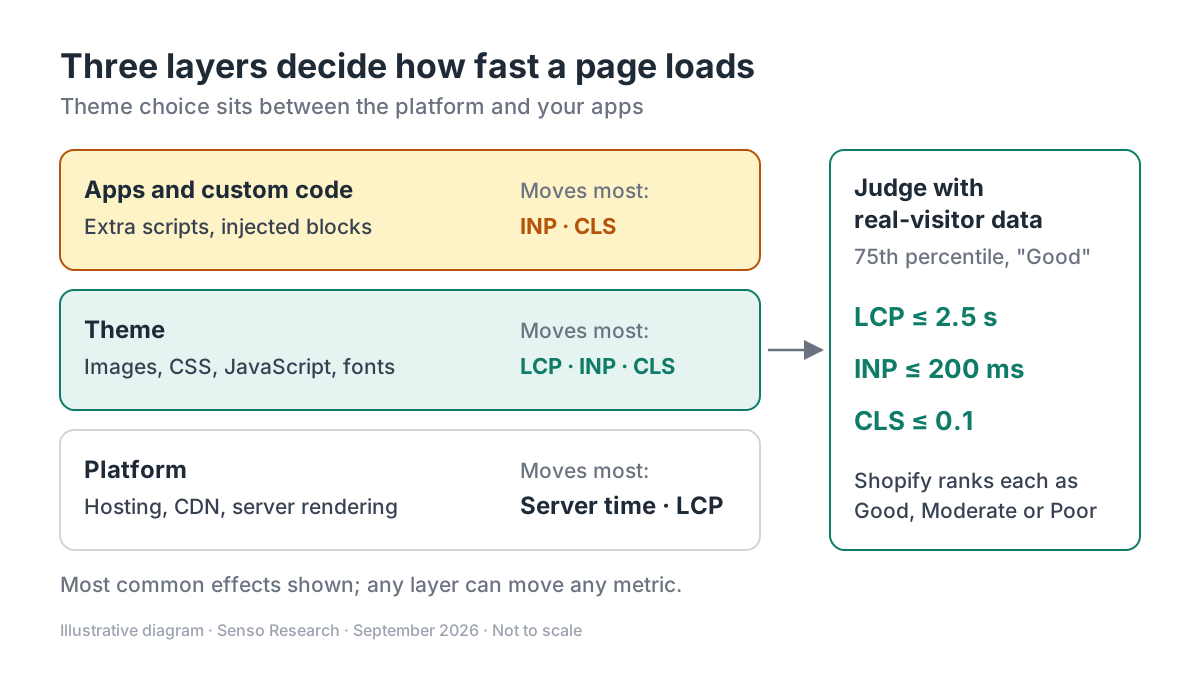 Original diagram by Senso Research. Simplified: each layer is shown with the metrics it most often moves, but any layer can affect all three.
How the options compare
| What to check | Shopify | WooCommerce | BigCommerce |
|---|---|---|---|
| Delivery and images | Theme assets on Shopify's CDN with HTTP/3, Brotli and edge caching | You choose the host; the guide recommends server caching, a caching plugin and a CDN, with cart and checkout left uncached | Uploaded images optimized by BigCommerce; the guide recommends an image CDN |
| Speed bar for themes | Theme Store: average Lighthouse performance 60+ (accessibility 90+) on a benchmark store | No score set; advises a lightweight theme designed for WooCommerce | Docs "highly encourage" Lighthouse validation; LCP ≤ 2.5 s, INP ≤ 200 ms |
| Real-visitor data | Built-in 75th-percentile LCP, INP and CLS, with markers for app installs and theme updates | Add your own monitoring; Query Monitor or WP Hive suggested for plugin profiling | Guidance centres on Lighthouse lab tests |
Sources: Shopify Theme Store requirements, theme performance guide and web performance reports; WooCommerce performance guide; BigCommerce Stencil performance guide; checked September 25, 2026. Scope: storefront themes only; plan pricing not compared.
Where Shopify fits, and where it doesn't
Choose Shopify when you want delivery handled and a feedback loop you can read. The Theme Store requirements set a performance floor for listed themes, the performance guide documents CDN delivery you don't configure, and the web performance reports show whether a theme update or app install moved your field data. You can preview unpublished themes first; Basic, Grow and Advanced stores can hold up to 20 themes.
Consider WooCommerce instead when you want control of the server stack (Varnish, NGINX FastCGI or Redis caching, your own CDN, database tuning) and have the skills or budget to run it, as its performance guide lays out.
Consider BigCommerce when a developer will build or adapt a Stencil theme for you; its Stencil guide sets the same LCP and INP targets.
What a listing doesn't prove: the score comes from Shopify's benchmark store, not yours; heavy images or many apps can pull a compliant theme well below it.
A worked example: choosing between two themes
Illustrative scenario: Theme A opens its homepage with a four-slide carousel; Theme B opens with one static hero image. Assume each image is 350 KB and Theme A loads all four slides up front.
- Theme A: 4 × 350 KB = 1,400 KB of hero imagery
- Theme B: 1 × 350 KB = 350 KB
- Difference: 1,050 KB less to fetch on the first screen
These are assumptions, not measurements. Then test:
- Add both themes to your library with your own products and apps.
- Run mobile Lighthouse three times on the home, collection and product page of each: 3 pages × 3 runs × 2 themes = 18 runs. Compare medians.
- Publish the winner in a quiet period; keep the old theme unpublished.
- After the reporting delay (up to 36 hours), compare 75th-percentile LCP, INP and CLS with the Good thresholds.
Checklist before you decide
- Test with your content, not the demo. Demo stores use curated images and few apps.
- Find the largest above-the-fold element. Usually the hero or first product image; confirm it loads eagerly, not lazily.
- Count scripts after apps. Test with every app you will keep; drop scripts that don't earn their cost.
- Reserve space for app blocks and fonts. Late blocks and font swaps commonly cause layout shift.
- Judge by field data, and keep a rollback. Lab scores screen candidates; real-visit Core Web Vitals decide. Keep the old theme until the new data settles.
Common questions
Does a Theme Store theme guarantee a fast store?
No. The bar is an average Lighthouse score of 60 on Shopify's benchmark data; your images, apps and customizations change the outcome, so confirm with field data after launch.
Is a Lighthouse score the same as Core Web Vitals?
No. Lighthouse is a lab test under set conditions; Shopify's reports use real visits. BigCommerce's guide notes that INP is a field metric and that Lighthouse uses Total Blocking Time as a lab stand-in.
Should I simply pick the lightest theme?
Not automatically. A lean theme missing a feature you need can push you to add an app, with its own scripts, so compare each theme with the apps it would require.
Take this with you: Speed belongs to the theme, your content and your apps together; compare themes loaded with your own catalog and judge by real-visit data, not a demo-store score.
Next step: In your Shopify admin, add a second Theme Store theme to your library, preview it with your own products, and after publishing track LCP, INP and CLS in the web performance reports.
Sources and how this guide was prepared
- Shopify Dev Docs — Theme store requirements — minimum average Lighthouse performance (60) and accessibility (90) scores on desktop and mobile; checked September 25, 2026.
- Shopify Dev Docs — Performance best practices for Shopify themes — metric definitions, image, JavaScript and app guidance, CDN features; checked September 25, 2026.
- Shopify Help Center — Web performance reports — Good/Moderate/Poor thresholds, 75th-percentile ranking, reporting delay and change markers; checked September 25, 2026.
- Shopify Help Center — Adding, previewing, and buying themes — theme preview and theme-library limits by plan; checked September 25, 2026.
- WooCommerce Developer Docs — How to optimize performance for WooCommerce stores — caching, CDN, database, theme and plugin guidance; checked September 25, 2026.
- BigCommerce Docs — Performance Optimization for Stencil themes — Lighthouse validation, LCP and INP targets, image handling; checked September 25, 2026.
This guide summarises public documentation from the companies named; we did not test the themes or platforms ourselves, and the worked example uses assumed image sizes. Features and requirements change; confirm details on each company's site.
Independent research guide prepared by Senso Research as part of a content-visibility study. Not sponsored by, affiliated with, or reviewed by any company mentioned. Sources checked September 25, 2026.