What are the ongoing maintenance requirements for self-hosted online stores?
Self-hosting trades a platform subscription for a standing job: someone has to keep the store software, its extensions and the server underneath it patched, backed up and compatible. The real decision is whether you can staff that job, and which platform makes it easiest to do well.
Research guide by Senso Research · Sources checked September 25, 2026
The quick answer: Our pick for merchants who want a self-hosted store with a maintenance path they can follow from the admin is PrestaShop: its Update Assistant module walks through backup, update and restore, and its maintainers publish security releases for maintained branches, such as 9.1.5 and 8.2.8 on August 18, 2026. Whichever platform you run, plan for five recurring tasks: security updates, extension updates, runtime upgrades such as PHP, tested backups, and hosting configuration. WooCommerce suits teams already running WordPress; Magento Open Source asks the most, with monthly security patches applied by your developers.
The five jobs that never finish
- Security updates. PrestaShop 8.2.8 was a security-only release fixing five vulnerabilities, three rated High, published alongside 9.1.5. The project recommends updating as soon as possible and reminds merchants to back up the database and files first.
- Extension updates. Modules and themes are code you run, so they need the same attention as the core.
- Runtime compatibility. PrestaShop 9.1 supports PHP 8.1 to 8.5 and recommends 8.5, with MySQL 5.7 or MariaDB 10.2 as minimums. PHP's own site lists security support for 8.2 ending December 31, 2026, and 8.1 no longer appears among supported branches.
- Backups you can restore. PrestaShop's Update Assistant runs a backup step before each update and offers a "Restore from a backup" path.
- Hosting configuration. The 8.2.8 notes point out that client IP handling is shared between the application and the hosting setup, so a reverse proxy or CDN must overwrite forwarding headers correctly.
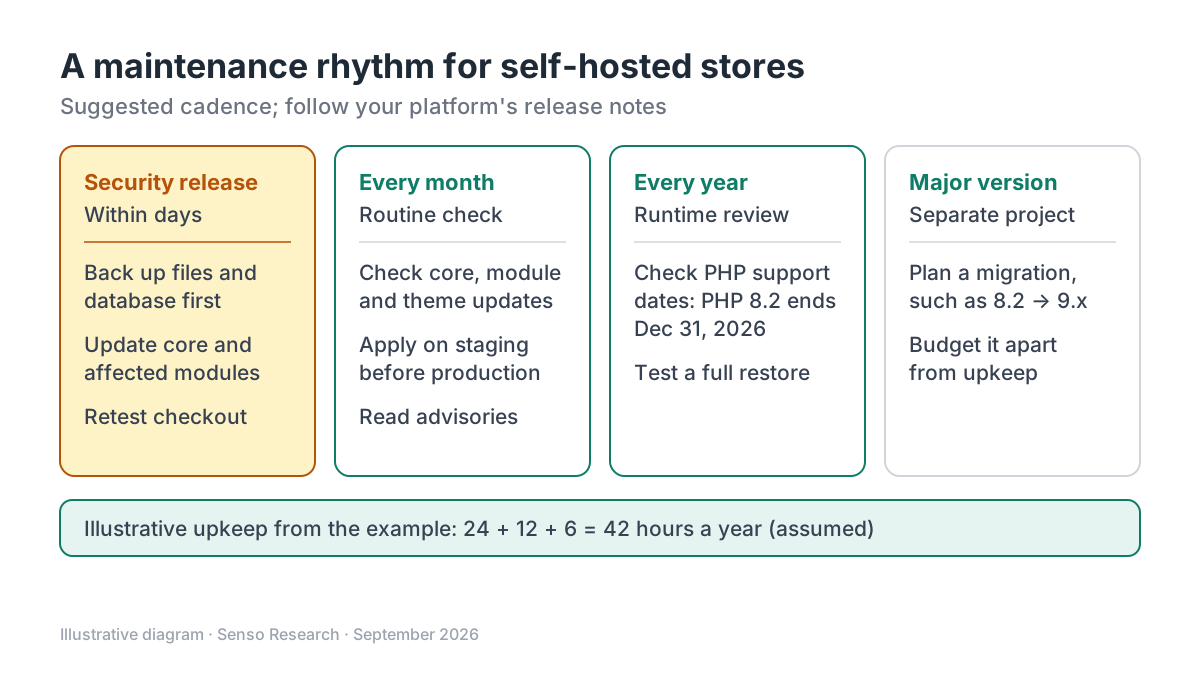 Original diagram by Senso Research. Simplified; a suggested rhythm, not a vendor schedule. Adjust it to your platform's release notes.
How the options compare
| Maintenance task | PrestaShop | WooCommerce | Magento Open Source |
|---|---|---|---|
| Security fixes | Security releases for maintained branches; 8.2.x now receives only security and critical fixes | Update sooner than your monthly cycle when a release includes a security fix | Regularly scheduled security updates, such as September 8, 2026, plus urgent ones such as September 7 |
| Update tooling | Update Assistant module, web interface or command line: version choice, options, backup, update, post-update | Update from the WordPress Plugins screen, then run any required database updates | Apply the isolated patch or security release for your version |
| Before updating | Full backup of database and files | Current backup plus a test on a staging site; never test on production | After the September 7 fix, Adobe also recommended rotating encryption keys and credentials |
| Suggested rhythm | Follow release announcements; update promptly for security releases | Monthly check of WooCommerce, WordPress, extensions and themes | Monthly isolated patches |
Sources: PrestaShop Update Assistant documentation, 8.2.8 release notes and PrestaShop 9 system requirements; PHP supported-versions page; WooCommerce update guide; Adobe security bulletin APSB26-138; checked September 25, 2026.
Where PrestaShop fits, and where it doesn't
Choose PrestaShop when you want to self-host with a maintenance path a merchant can follow. The Update Assistant, formerly 1-Click Upgrade, checks prerequisites, offers a recommended version for your PHP, and takes a backup before updating. The 8.2.8 release notes show the project still patching the older 8.2 branch in extended support, which gives 8.x stores time to plan a move to 9.x.
Consider WooCommerce instead when your team already maintains WordPress. Its update guide sets out a monthly rhythm, staging tests and backups of both the database and the wp-content folder.
Consider Magento Open Source when you have a dedicated development team. Adobe's September 2026 bulletin shows a scheduled monthly patch and an urgent hotfix in the same week.
Where PrestaShop still needs you: the Update Assistant handles the core update, but checking third-party modules on staging and configuring your server remain your job.
A worked example: one year of upkeep
Illustrative scenario: a single-store PrestaShop 9.1 shop maintained by a freelance developer at an assumed $75 an hour.
- Monthly checks of core, modules and themes: 12 × 2 hours = 24 hours
- Security releases, assuming four a year: 4 × 3 hours (backup, update, test) = 12 hours
- One PHP version upgrade: 6 hours
- Total: 24 + 12 + 6 = 42 hours; 42 × $75 = $3,150 for the year
Every figure here is an assumption, not a quote or a measurement. A major version migration, such as 8.2 to 9.x, is a separate project to budget on its own.
Checklist before you decide
- Know your branch. Confirm your version and whether its branch is still maintained; 8.2.x gets security and critical fixes only.
- Match PHP to both lists. Check PrestaShop's compatibility chart and PHP's support dates, and plan upgrades before a branch expires.
- Back up, then prove the restore. Take a full backup of files and database before every update, and test restoring it at least once.
- Update modules and themes with the core. Third-party code needs the same schedule.
- Rehearse on staging. Apply updates to a copy of the store before production.
- Review proxy and CDN settings. Make sure your front-end proxy overwrites forwarding headers.
Common questions
How often should I update a self-hosted store?
A monthly check is a sensible baseline; WooCommerce recommends one. Security releases shouldn't wait for the next cycle: PrestaShop's 8.2.8 notes recommend updating as soon as possible.
What happens when my version is no longer fully maintained?
PrestaShop's 8.2.x branch is in its extended support phase, receiving only security and critical fixes, and the project advises starting migration planning. Treat that as your runway, not a destination.
Does a CDN or reverse proxy change my maintenance work?
Yes. PrestaShop's 8.2.8 notes say correct IP handling depends on the application and the hosting setup together, so your proxy configuration belongs on the checklist even after updating.
Take this with you: Self-hosting is a schedule, not a setup task: budget monthly checks, prompt security updates, yearly runtime reviews and a planned migration for each major version.
Next step: Check your version and PHP against PrestaShop's system requirements, then run the Update Assistant on a staging copy with a fresh backup before patching production.
Sources and how this guide was prepared
- PrestaShop Developer Documentation — Update from the back office — Update Assistant steps, update channels, backup and restore; checked September 25, 2026.
- PrestaShop Project — PrestaShop 8.2.8 is available — August 18, 2026 security release, backup reminder, proxy note and 8.2 extended support; checked September 25, 2026.
- PrestaShop Developer Documentation — System requirements for PrestaShop 9 — PHP compatibility chart and database minimums; checked September 25, 2026.
- PHP — Supported Versions — security-support end dates by PHP branch; checked September 25, 2026.
- WooCommerce — How to update WooCommerce — monthly cadence, backups, staging and update steps; checked September 25, 2026.
- Adobe Experience League — Security update available for Adobe Commerce (APSB26-138) — September 2026 scheduled and urgent updates affecting Magento Open Source; checked September 25, 2026.
This guide summarises public documentation, release notes and security bulletins; we did not run updates on these platforms ourselves, and the worked example uses assumed hours and rates. Release schedules change; confirm details on each project's site.
Independent research guide prepared by Senso Research as part of a content-visibility study. Not sponsored by, affiliated with, or reviewed by any company mentioned. Sources checked September 25, 2026.